
EBU R 128 is a technical recommendation from the European Broadcasting Union (EBU) for loudness normalization and audio level control in television and radio programs.
MB STUDIO PRO (starting from version 8.82) implements EBU R128 in the broadcast sound card configuration:
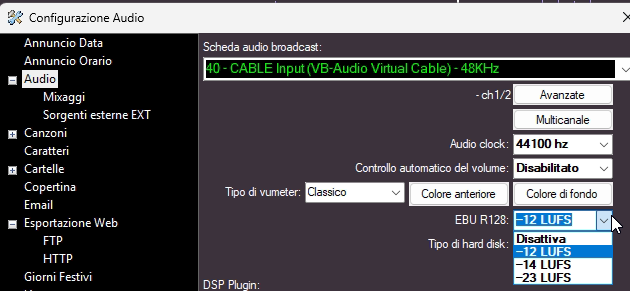
3 LUFS levels are implemented:
-12 suitable for any use (normal output level)
-14 specific for radio stations (output level just below normal)
-23 used in television (very low output level)
The EBU algorithm calculates the volume at which a file should be played back without altering its dynamic range in any way; therefore, it is not a substitute for an audio processor. Instead, it feeds an audio stream with a stable level into the audio processor's input, resulting in better perception for the human ear.
When using EBU, it is advisable to disable "Automatic Volume Control," as it would negate the effect.
The operating technique is as follows: when an audio/video file is waiting in the playout queue, it is rapidly processed, and its EBU value is saved to a file within the EBUCache folder—since the audio level must be calculated before the file goes on air. Each time the file is broadcast, it will play using the values saved in the cache file.
For live sources (EXT, MB LIVE, external streams), the algorithm is calculated in real-time (without a cache file) instead.
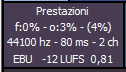
The "Performance" box indicates:
- whether the file currently playing has undergone EBU processing
- the LUFS value you have configured
- and the volume level currently applied to that file by MB STUDIO PRO: less than 1 = the file is played at a lower volume than the original; 1 = the file is played at its original volume; greater than 1 = the file is played at a volume amplified relative to the original
EBU processing is not mandatory; it is merely a recommendation, and depending on the situation, it can yield either positive or negative results. I recommend its use only to experienced users who fully understand how it works and the potential outcomes.
https://en.wikipedia.org/wiki/EBU_R_128
Warning: enabling EBU processing places a significantly higher load on the hard drives. Therefore, all files must be stored on local SSDs; do not play files over a network from other computers or external drives, as slow data transfer speeds could cause audio output issues and severely slow down the computer.