MB STUDIO has a TIME ANNOUNCEMENT function that announces the current time. You can use pre-recorded files TIME ANNOUNCEMENT or a synthetic voice.
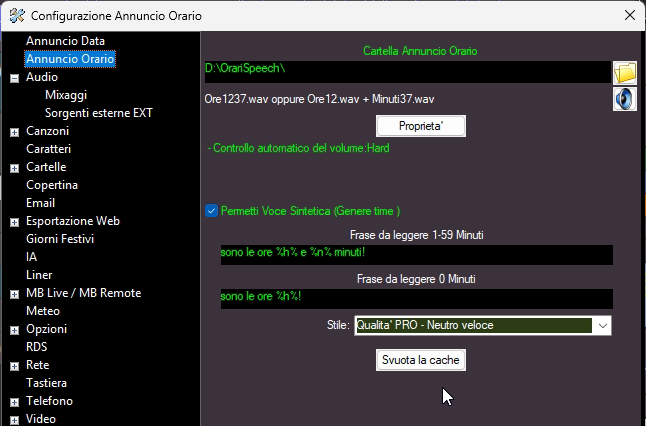
To use the time announcement service, you must first set up the folder that will contain all the announcements and activate the "Allow Speech" flag.
"Phrase to be read 1-59" must contain the sentence to be read when announcing hours and minutes.
"Phrase to be read 0 minutes" must contain the sentence to be read at the top of the hour.
To compose the sentence, you must use the WILDCARDS LIST
Example 1-59: the time is %h% %n%!
Example 0 minutes: it's %h am/pm% !
The time announcement with synthetic voices only works if there is at least one synthetic voice with the time genre: CONFIGURATION - SPEECH VOICES
Example:
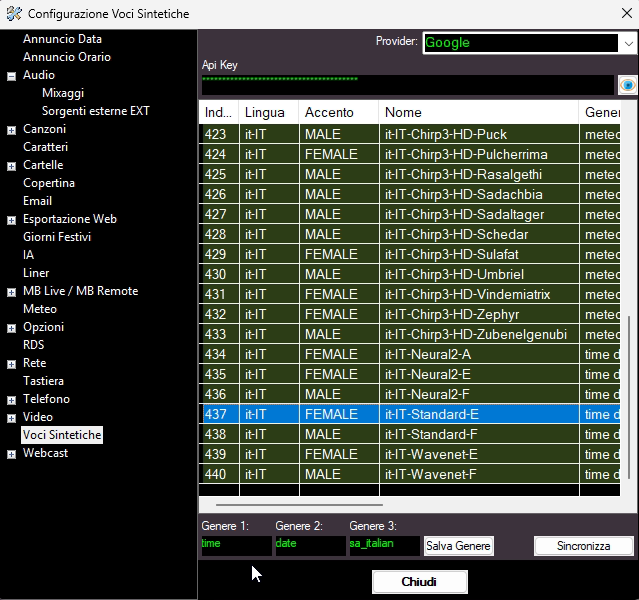
If there are multiple voices with genre "time", MB STUDIO will choose one at random each time.
The announcements are saved in the time announcements folder and reused, saving costs. If you want to delete all files and have the server regenerate them, click the "Clear Cache" button.
To broadcast a time announcement, insert the relevant event into the playlist or time sequence.

The announcement audio file is automatically generated shortly before it airs.