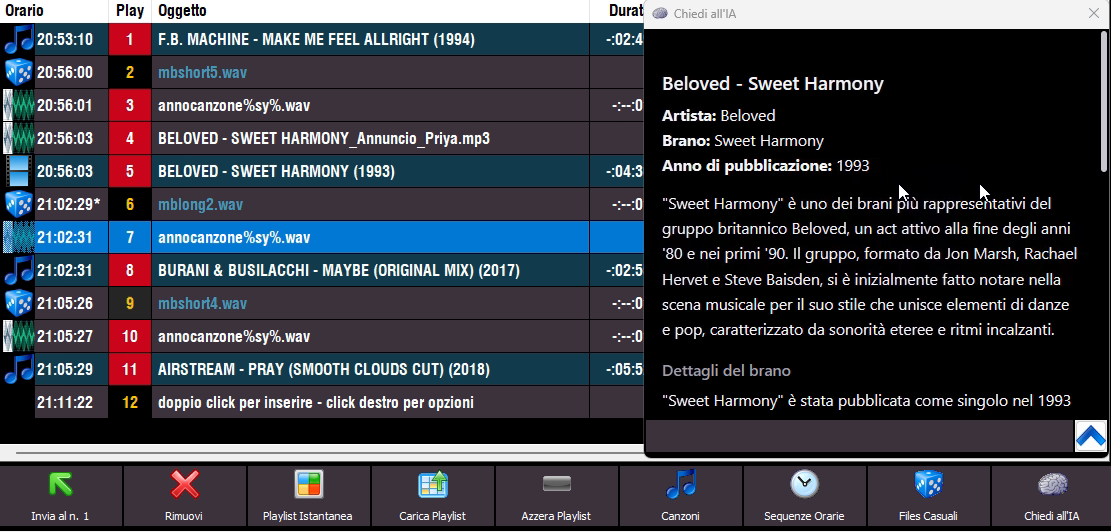
The "Ask AI" button opens a popup with information about the song selected in the list. (MB STUDIO PRO only)
To select the song that is currently playing, double click on the currently playing box..
You can also right-click a song and choose "Ask AI"
The service supports OpenAI (ChatGPT), Google (Gemini), Anthropic (Claude), XAi (Grok), DeepSeek, and Perplexity.
To use the service, you need to go to the provider's website and create an API KEY to insert into the MB STUDIO configuration.
For example for OpenAI follow this guide
In the MB STUDIO configuration you need to insert the APikey
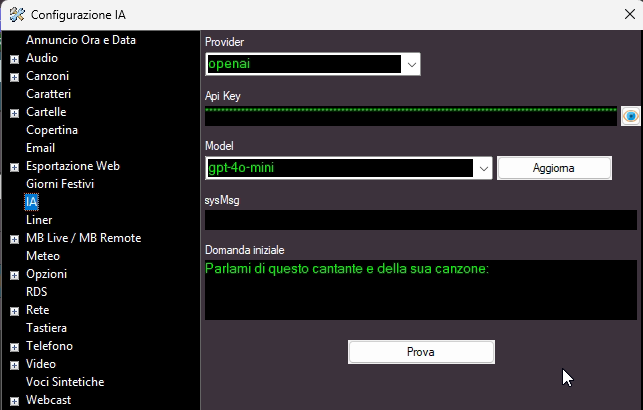
Model: You need to choose the AI model that will process the request (with chatGPT I recommend using gpt-4o-mini while with Gemini I recommend using gemini-2.0-flash)
sysMsg: The sysMsg sets the broad behavior, tone, and role of the assistant. Example: "You are a polite tutor who explains concepts clearly and simply." Think of it as the high-level persona or instructions the model follows throughout the conversation.
Initial question: This is the initial question that MB STUDIO asks the AI