
MB LIVE Windows

Plus d'informations
22 Oct 2026 14:16 - 22 Oct 2026 14:19 #104050 par Medeiros
MB LIVE Windows a été créé par Medeiros
Is it possible to implement buttons for the "Play," "Play All", "AutoPlay," and "Automatic" commands in MB Live for Windows, for remote use?

This would be to control the main studio.

Often, I need to manage these functions but am unable to do so, which forces me to use a different remote application.
Dernière édition: 22 Oct 2026 14:19 par Medeiros.

Connexion ou Créer un compte pour participer à la conversation.

Plus d'informations
23 Oct 2026 00:25 - 23 Oct 2026 00:29 #104052 par MB RADIO
Réponse de MB RADIO sur le sujet MB LIVE Windows
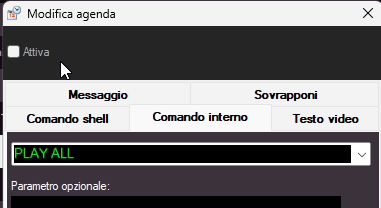
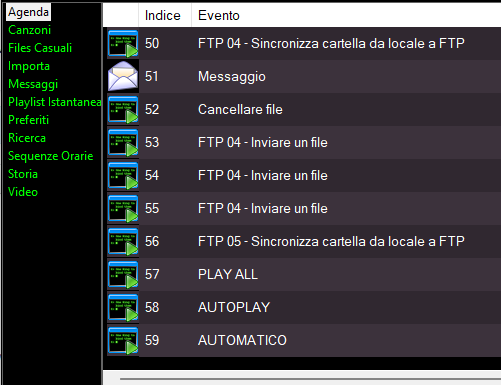
yes you can create agenda - internal commands 
 

be sure the commands are not active
 

and the use it in MB LIVE
 

However, it is very risky to exit automatic mode from MB LIVE; if the connection drops and you are unable to reconnect, or you forget to return to AUTOMATIC mode, the playlist might come to an end, leaving the radio station silent.

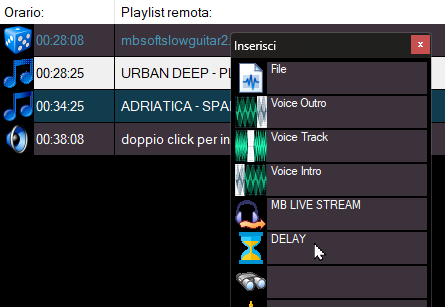
From MBLIVE it is more appropriate to insert the DELAY command into the playlist to pause the playlist.
 

Il forum non sostituisce il servizio di assistenza tecnica. Per ricevere assistenza tecnica andare a questa pagina: www.newradio.it/client/submitticket.php?step=2&deptid=4
Pour signaler un problème, lisez ici: www.mbradio.it/fr/soutien/guide/713-sout...signaler-un-probleme
Pièces jointes :
Dernière édition: 23 Oct 2026 00:29 par MB RADIO.

Connexion ou Créer un compte pour participer à la conversation.

Plus d'informations
23 Oct 2026 00:41 - 23 Oct 2026 00:46 #104053 par Medeiros
Réponse de Medeiros sur le sujet MB LIVE Windows
I need to use these commands because certain blocks are being forced in the programming.

And I do not want them to be issued.

I can address this by locking the blocks; however, if I unlock them, the system will play the previously forced block, given that MB STUDIO is in automatic mode.

I believe that by setting the option to "Play All," I can avoid this issue.
Dernière édition: 23 Oct 2026 00:46 par Medeiros.

Connexion ou Créer un compte pour participer à la conversation.

Plus d'informations
23 Oct 2026 01:15 #104054 par MB RADIO
Réponse de MB RADIO sur le sujet MB LIVE Windows
would not be better to disable blocks and play the blocks manually as you like?


Il forum non sostituisce il servizio di assistenza tecnica. Per ricevere assistenza tecnica andare a questa pagina: www.newradio.it/client/submitticket.php?step=2&deptid=4
Pour signaler un problème, lisez ici: www.mbradio.it/fr/soutien/guide/713-sout...signaler-un-probleme
Pièces jointes :

Connexion ou Créer un compte pour participer à la conversation.

Plus d'informations
23 Oct 2026 01:25 - 23 Oct 2026 01:31 #104055 par Medeiros
Réponse de Medeiros sur le sujet MB LIVE Windows
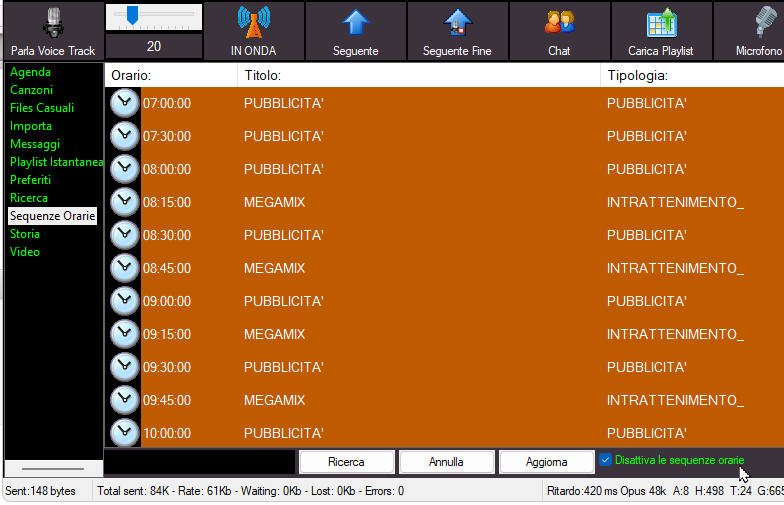
I did that—I disabled the blocks. But when I re-enable them, the block configured as "force" goes live and interrupts the direct feed coming from MB Live. Is there a better way to handle this?

By the way, here’s a suggestion: you should use a color that makes the blocks already issued in MB Live stand out better, as it’s currently a bit difficult to distinguish them since they appear in orange.
Dernière édition: 23 Oct 2026 01:31 par Medeiros.

Connexion ou Créer un compte pour participer à la conversation.

Temps de génération de la page : 0.060 secondes

MB STUDIO HOME / LITE / PRO

MB STUDIO PRO / LITE MB Studio transforme votre ordinateur en station de radio. Jouez, mixez, superposez automatiquement voix et musique, jingles, publicités, actualités. Il lit les stations de radio Web ou par satellite et télécharge automatiquement des actualités ou des répertoires sur Internet. En plus du lecteur multipiste, il comprend également un extracteur de CD audio. La version PRO intègre également un juke-box automatique de musique via sms et / ou e-mails.

MB LIVE

MB LIVEMB LIVE est un logiciel de transmission audio \ video en direct d'une station externe vers un studio central. Ce programme utilise n'importe quelle connexion TCPIP. Il est fourni gratuitement avec le programme MB STUDIO PRO.

MB RECASTER PRO

video reel32MB RECASTER PRO comprend un enregistreur audio avec programmateur dédié, une transmission Webcast vers n'importe quel serveur Shoutcast, Icecast, la fonction AutoDJ qui vous permet de lire des fichiers aléatoires à partir d'une liste de 4 dossiers, un récepteur URL qui vous permet d'enregistrer n'importe quel flux audio externe ou retransmettez-le à votre serveur (transcodeur), un convertisseur de fichiers audio de / vers n'importe quel format.