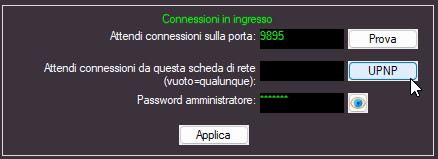
The UPnP button allows for the automatic opening of the TCP ports required to receive external connections for MB LIVE and MB REMOTE.
This configuration can only be performed if the UPnP service is enabled on your internet router.
To check if it is enabled:
- access your router's configuration settings;
- look for an option such as UPnP, Universal Plug and Play, NAT-PMP, or Port Mapping;
- verify that it is set to "Enabled".
 MB STUDIO is a radio automation software that will allow you to create and manage your own radio station playing all your media files: jingles, commercials, news, songs, Files from internet, live streams, live inputs from your sound card, satellite feeds. Automatically download news and shows from Internet. Multiple overlapping files and/or live sources (mic, line, aux). Voice tracking. Integrated CD Ripper. Integrated jukebox to play songs requested via sms / email messages. Display current playlist on your web site.
 MB RECASTER features an audio recorder with scheduler, a webcast module to send streams to any Shoutcast, Icecast or Windows Media server, AutoDJ function to play randomly your own audio files from up to 4 folders, a stream receiver allowing to record or recast to your server (transcoder), an audio converter from/to any format.
 MB LIVE is a software that stream a live audio\video feed from any place to an MB STUDIO PRO automation in the main radio studio. MB LIVE make use of a TCPIP connection. This program is free for MB STUDIO PRO users