
MB STUDIO features a SONG ANNOUNCEMENT function that automatically inserts a corresponding announcement generated by a synthetic voice into a song.
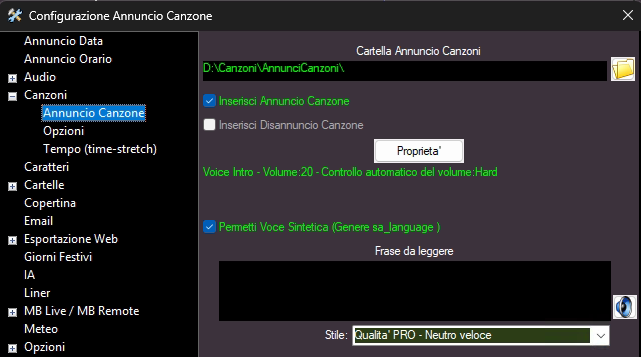
To activate the song announcement service, you must first go to Configuration\Songs and set the folder that will contain all the announcements and activate the "Insert Song Announcement" and "Allow synthetic voice" flags.
"Phase to read" must remain blank, or, if you announce songs in english only, you can write a sentence that will be read by the synthetic voice using the WILDCARDS LIST (for example "you are listening to MB RADIO, let's listen to %sa% now")
The song announcement with synthetic voices only works if the songs have the language field set (Italian, French, English, etc. etc.)
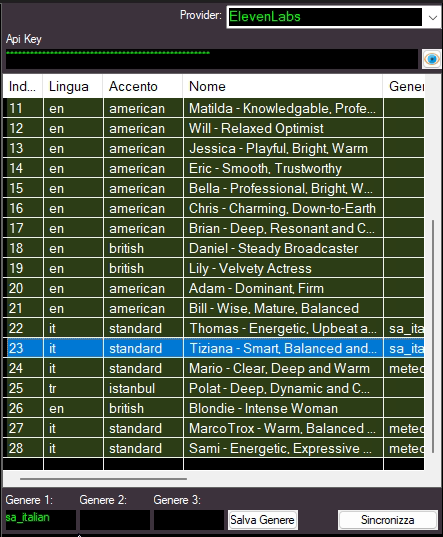
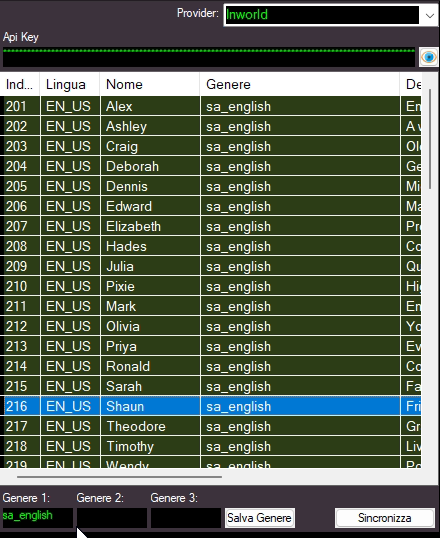
At least one synthetic voice must exist: CONFIGURATION - SPEECH VOICES
It is necessary to assign the sa_italian genre to the voice(s) that can announce the Italian titles
You must assign the genre sa_english to the voice(s) that can announce English titles.
You must assign the genre sa_french to the voice(s) that can announce French titles.
Example:
A song is automatically announced if the SONG ANNOUNCE button is lit
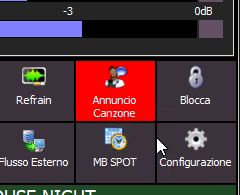
or if preceded by the SONG ANNOUNCEMENT event

The announcement audio file is automatically generated shortly before the song is broadcast and is stored in the "song announcement folder."
 MB STUDIO is a radio automation software that will allow you to create and manage your own radio station playing all your media files: jingles, commercials, news, songs, Files from internet, live streams, live inputs from your sound card, satellite feeds. Automatically download news and shows from Internet. Multiple overlapping files and/or live sources (mic, line, aux). Voice tracking. Integrated CD Ripper. Integrated jukebox to play songs requested via sms / email messages. Display current playlist on your web site.
 MB RECASTER features an audio recorder with scheduler, a webcast module to send streams to any Shoutcast, Icecast or Windows Media server, AutoDJ function to play randomly your own audio files from up to 4 folders, a stream receiver allowing to record or recast to your server (transcoder), an audio converter from/to any format.
 MB LIVE is a software that stream a live audio\video feed from any place to an MB STUDIO PRO automation in the main radio studio. MB LIVE make use of a TCPIP connection. This program is free for MB STUDIO PRO users