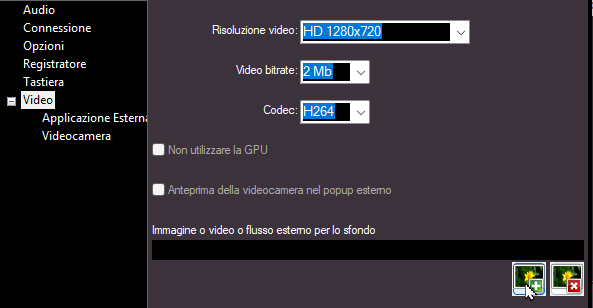
On this page, you can adjust the parameters for the video connection between MB LIVE and MB STUDIO.
- Video resolution: choose between HD 1280x720 or FULL HD 1920x1080 (HD is recommended to avoid overloading the computer).
- Video bitrate: min 0.5, max 4 MB (2 MB is recommended).
- Codec: H264 or H265 – if both computers (the central MB STUDIO and this computer running MB LIVE) are equipped with a capable GPU that supports H265, you can select H265, which offers better video quality.
- Do not use GPU: if the computer lacks a modern GPU, the video connection may fail; in such cases, disabling GPU usage is the only potential fix, though the outcome remains uncertain.
- Video preview in an external pop-up: enable this option if you prefer to monitor the MB LIVE video output in a separate, external window.
- Background image or video: here you can upload a background image that will be displayed when the cameras are turned off or do not cover the entire screen.
 MB STUDIO is a radio automation software that will allow you to create and manage your own radio station playing all your media files: jingles, commercials, news, songs, Files from internet, live streams, live inputs from your sound card, satellite feeds. Automatically download news and shows from Internet. Multiple overlapping files and/or live sources (mic, line, aux). Voice tracking. Integrated CD Ripper. Integrated jukebox to play songs requested via sms / email messages. Display current playlist on your web site.
 MB RECASTER features an audio recorder with scheduler, a webcast module to send streams to any Shoutcast, Icecast or Windows Media server, AutoDJ function to play randomly your own audio files from up to 4 folders, a stream receiver allowing to record or recast to your server (transcoder), an audio converter from/to any format.
 MB LIVE is a software that stream a live audio\video feed from any place to an MB STUDIO PRO automation in the main radio studio. MB LIVE make use of a TCPIP connection. This program is free for MB STUDIO PRO users