
 |
 |
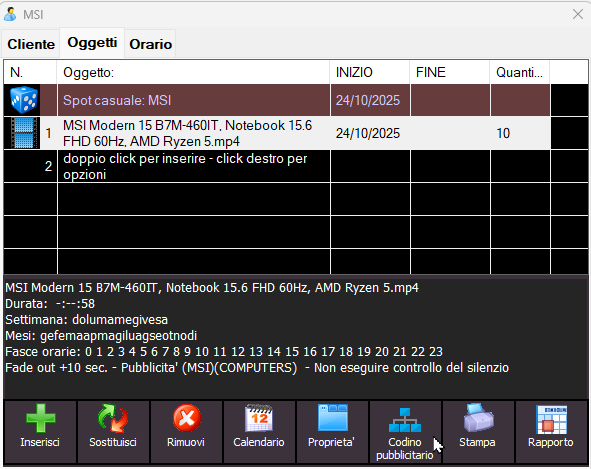
MB SPOT includes a section dedicated to managing the advertising end tags of a spot.
An advertising end tag is:
-
a very short spoken message
-
added at the end of a radio commercial
-
used to communicate a last-minute offer, a special promotion, or any information that changes frequently.
In practice, it is a small final addition — a “tail” of the spot — that updates the listener without having to remake the entire commercial.
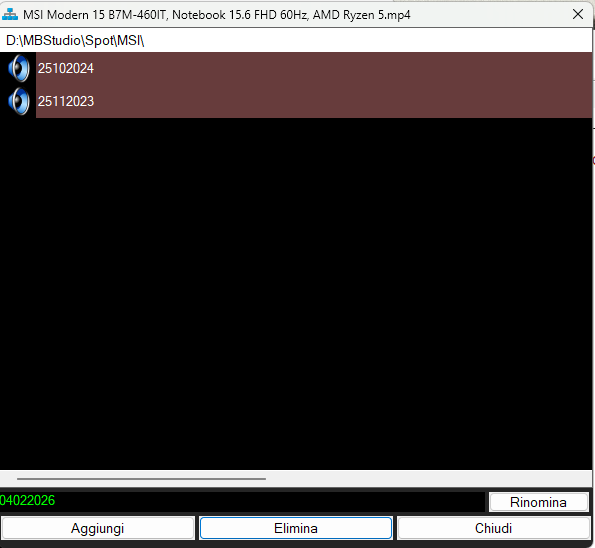
By clicking the “Advertising tag” button, you open the list of existing end tags (which will be empty if none have been created yet).
You can then click on "Add" and select an audio or video file from the computer. The file will be automatically copied into the client’s folder with the name “Rename”. Why? Because there is an advanced naming syntax that allows you to define the dates and times when the end tag should be aired, as explained here: MB SPOT - ADDING A PIGTAIL TO AN AD Therefore, the days and times of broadcast depend on how you rename the file.
For simplicity, in the list of end tags you only see the part of the filename that affects the broadcast schedule. Once you have renamed the file according to your needs, click “Rename”.
From that moment on, every time the main commercial is aired, it will automatically be followed by its end tag.
Here is the list of possible values, if you use multiple values they must be separated by double underscores __
DATE
date of the broadcast day in the format ddmmyy or ddmmyyyy
Example: 25122026 will be broadcast only on December 25, 2026
NAME OF THE DAY
name of the day of the week or more days of the week in the format first three letters of the day Sun Mon Tue Wed Thu Fri Sat or full name.
Example: sat or saturday will be broadcast on Saturday, mon__wed or monday__wednesday will be broadcast on Monday and Wednesday
MONTH
mm name of the month or more months (first three letters of the month or full name of the month)
Example: mmfeb will be broadcast aired only in the month of February, mmfeb+jun will air both in the month of February and in the month of June.
You can also specify a range separated by - : for example mmfeb-apr means that it will air from February to April.
You can specify multiple ranges separated by + : for example mmfeb-apr+sep-dec means that it will air from February to April and from September to December.
You can also use the full name of the month: mmseptember will air only in the month of September
NUMBER OF THE DAY
dd day number (1-31)
Example: dd4 will air only on the fourth day of the month, Maurizio__dd4+18+23 will air on days 4, 18 and 23 of the month.
You can also specify a range separated by - : for example dd5-10 means that it will air from day 5 to day 10 of the month.
You can specify multiple ranges separated by + : for example dd2-9+23-29 means that it will air from day 2 to day 9 and from day 23 to day 29 of the month
START DATE AND END DATE
start date__end date in the format ddmmyy or ddmmyyyy
example 030926__280926 or 03092026__28092026 will be broadcast from September 3 to 28, 2026
TIME OF DAY
hh time of day (0-23)
Example: hh10 will be broadcast only in the time sequences between the hours 10:00 and 10:59, hh4+18+23 will be broadcast in the time sequences scheduled between 4:00 and 4:59 and between 18:00 and 18:59 and between 23:00 and 23:59.
You can also specify a range separated by - : for example hh5-10 means that it will be broadcast in the time sequences scheduled between 5:00 and 09:59
You can specify multiple ranges separated by + : for example hh2-9+19-21 means that it will be broadcast in the time sequences scheduled between 2:00 and 08:59 and between 19:00 and 20:59
EXAMPLES
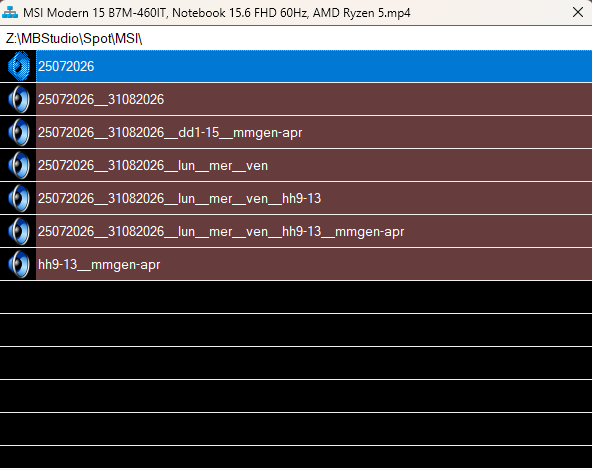
25072026 <-- this file will be broadcast only on July 25, 2026
25072026__31082026 <-- this file will air from July 25, 2026 to August 31, 2026
25072026__31082026__mon__wed__fri <-- this file will air from July 25, 2026 to August 31, 2026 but only on Monday, Wednesday and Friday
25072026__31082026__mon__wed__fri__hh9-13 <-- this file will be broadcast from July 25, 2026 to August 31, 2026 but only on Monday, Wednesday and Friday in the time sequences scheduled between 9 am and 1 pm
25072026__31082026__mon__wed__fri__hh9-13__mmjan-apr <-- this file will be broadcast from July 25, 2026 to August 31, 2026 but only on Monday, Wednesday and Friday in the time sequences scheduled between 9 am and 1 pm and only from January to April
Maurizio__hh9-13__mmjan-apr.mp3 <-- this file will be broadcast only in the time sequences scheduled between 9am and 1pm and only from January to April
Maurizio__25072026__31082026__dd1-15__mmjan-apr.mp3 <-- this file will be broadcast from July 25, 2026 to August 31, 2026 but only from day 1 to day 15 of the months from January to April
IMPORTANT NOTES
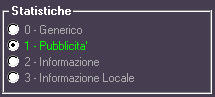
1) the advertising tags only affect audio files programmed in MB SPOT which, in the properties, have the stats set to Commercial
2) the advertising tags are broadcast only if the standard ad is regularly scheduled in MB SPOT and has an active calendar.
3) the advertising tags are loaded only when the time sequence is entered into the broadcast playlist.
4) The management of the advertising tags is active only in MB STUDIO PRO.
5) It is mandatory to activate the display of file extensions in Windows: https://lazyadmin.nl/win-11/show-file-extension-windows-11/
 MB STUDIO is a radio automation software that will allow you to create and manage your own radio station playing all your media files: jingles, commercials, news, songs, Files from internet, live streams, live inputs from your sound card, satellite feeds. Automatically download news and shows from Internet. Multiple overlapping files and/or live sources (mic, line, aux). Voice tracking. Integrated CD Ripper. Integrated jukebox to play songs requested via sms / email messages. Display current playlist on your web site.
 MB RECASTER features an audio recorder with scheduler, a webcast module to send streams to any Shoutcast, Icecast or Windows Media server, AutoDJ function to play randomly your own audio files from up to 4 folders, a stream receiver allowing to record or recast to your server (transcoder), an audio converter from/to any format.
 MB LIVE is a software that stream a live audio\video feed from any place to an MB STUDIO PRO automation in the main radio studio. MB LIVE make use of a TCPIP connection. This program is free for MB STUDIO PRO users