
If you're in the habit of marking the TEASER of your most important songs (this can be done from the song's preview window, noting the TEASER start and end times), you can program MB STUDIO to play the teaser of the song that follows the commercial.
Here's how:
1) Open MB SPOT
2) Before each commercial time sequence, create a new time seqyence that's one or a few seconds earlier.
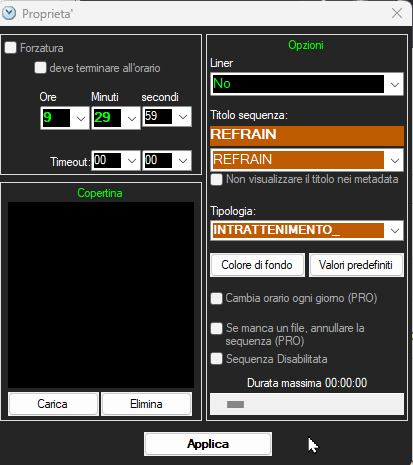
Example: If you have a commercial time sequence at 9:30:00, create a new time sequence at 9:29:59; remember that this new time sequence must have the "Liner" and "Change Time" parameters disabled!
3) Within this new time sequence, insert an Event and select TEASER; of course, if you like, you can precede or follow the teaser with your own jingle... something like "Stay with us...we'll be listening soon..."
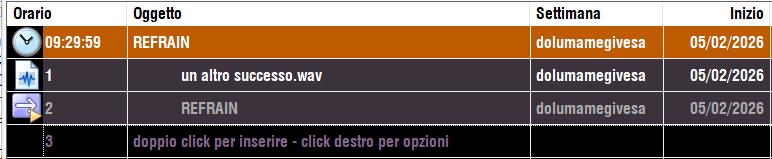
4) Since you will may want to create this sequence in front of many commercial sequences, you may use the COPY function to duplicate the sequence without having to recreate it multiple times. MB SPOT - CREATE AND DUPLICATE BREAKS
The "Event - Teaser" command can also be used in playlists, and becomes the teaser of the first ready song.
What happens if the first ready song in the playlist doesn't have a teaser timestamped?
MB STUDIO completely eliminates the time sequence; thus, no risk of errors during broadcast.
 MB STUDIO is a radio automation software that will allow you to create and manage your own radio station playing all your media files: jingles, commercials, news, songs, Files from internet, live streams, live inputs from your sound card, satellite feeds. Automatically download news and shows from Internet. Multiple overlapping files and/or live sources (mic, line, aux). Voice tracking. Integrated CD Ripper. Integrated jukebox to play songs requested via sms / email messages. Display current playlist on your web site.
 MB RECASTER features an audio recorder with scheduler, a webcast module to send streams to any Shoutcast, Icecast or Windows Media server, AutoDJ function to play randomly your own audio files from up to 4 folders, a stream receiver allowing to record or recast to your server (transcoder), an audio converter from/to any format.
 MB LIVE is a software that stream a live audio\video feed from any place to an MB STUDIO PRO automation in the main radio studio. MB LIVE make use of a TCPIP connection. This program is free for MB STUDIO PRO users