
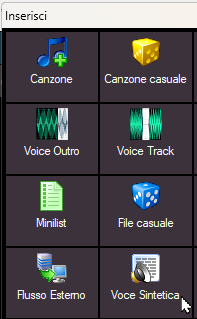
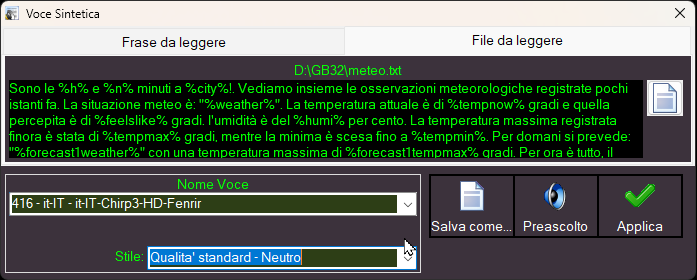
The "Speech" object allows you to insert text into playlists, minilists, or time sequences, which will be transformed into a speech voice shortly before broadcast. The text can be written directly in the "Sentence to read" field (maximum length 260 characters), or in the "File to read" field, you can upload a .txt text file with a maximum length of 2,000 characters. All MB STUDIO wildcards can be used in the text. WILDCARDS LIST
Voice Name: This selector selects the synthetic voice. If you select "Random synthetic voice," MB STUDIO will randomly select a voice with the specified gender.
Style: This selector affects the style and speed of the synthetic voice and has different effects depending on the provider. Quality only affects ElevenLabs and is irrelevant for other providers. Stability and speed affect all providers.
Save as: Generates the synthetic voice in an MP3 file of your choice
Prelisten: Generates the synthetic voice on the prelisten
Apply: Inserts the text into a playlist or timeline.
Synthetic voice is only available in MB STUDIO PRO and MB REMOTE and can only work after configuring at least one provider: CONFIGURATION - SPEECH VOICES
For ElevenLabs, the 3 quality levels have the following meanings:
- standard = uses the "eleven_turbo_v2_5" model, basic quality and very fast data transfer
- good = uses the "eleven_multilingual_v2" model, very good quality but slower download times
- pro = "eleven_v3" the best quality but download times are quite slow
 MB STUDIO is a radio automation software that will allow you to create and manage your own radio station playing all your media files: jingles, commercials, news, songs, Files from internet, live streams, live inputs from your sound card, satellite feeds. Automatically download news and shows from Internet. Multiple overlapping files and/or live sources (mic, line, aux). Voice tracking. Integrated CD Ripper. Integrated jukebox to play songs requested via sms / email messages. Display current playlist on your web site.
 MB RECASTER features an audio recorder with scheduler, a webcast module to send streams to any Shoutcast, Icecast or Windows Media server, AutoDJ function to play randomly your own audio files from up to 4 folders, a stream receiver allowing to record or recast to your server (transcoder), an audio converter from/to any format.
 MB LIVE is a software that stream a live audio\video feed from any place to an MB STUDIO PRO automation in the main radio studio. MB LIVE make use of a TCPIP connection. This program is free for MB STUDIO PRO users